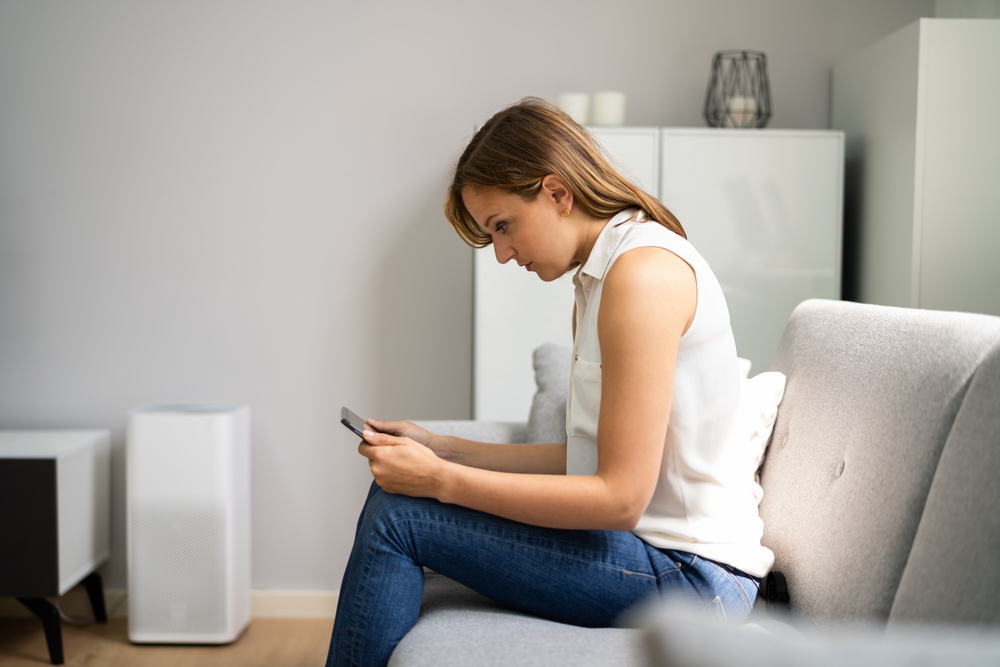
What is tech neck?
The advent of handheld technology such as laptops, tablets and smartphones has yielded easy access to the internet; but it has also brought changes in posture for most people. With small devices, the need to bend over to see the screen has created a posture called "Tech Neck". It's the head forward, hunched over position that we move into, to better see the screen. While that name is not an official diagnosis, it is widely known as a common musculoskeletal issue.
Why looking down is hard on your neck
The average head weighs about 10-12 lbs., similar to a small bowling ball. Tilting your head forward increases the load on your neck to hold this bowling ball up at an awkward angle.
Extended time in this position can cause neck and upper back discomfort, headaches, or stiffness and pain in the neck. If the cervical vertebrae of the neck are compressed, they can pinch nerves that run down your arms and cause pain all the way down to your fingers.
What happens if you ignore it
If ignored, this posture can lead to reduced mobility; chronic neck or upper-back pain; postural changes such as rounded shoulders and forward-head posture; degenerative disc issues and nerve compression or tingling in arms.
But don't despair, it is easy to rectify.
How to prevent tech neck: 7 simple fixes
- Raise your devices to eye level by using a holder for your phone or tablet. Keep your screen directly in front of you to avoid twisting your neck.
- Take frequent breaks every 20-30 minutes; practice looking far away to give your eyes a break as well. Set a timer if you tend to get caught up in work and forget how much time has passed.
- Keep your shoulders and neck muscles strong and flexible; see a physical therapist for help with a strengthening and stretching routine.
- Set up your laptop with an external monitor. The monitor should be directly in front of you at eye level. A good way to gauge your posture: sit in front of your monitor with your shoulders relaxed, arms at your side, your head over your shoulders and your eyes closed. Don't move, then open your eyes. You should be able to see your monitor clearly without having to move your head at all.
- Use this same posture for your tablet and phone when possible.
- Stop using devices and over stimulating activities 1 hour before bedtime so that you get a good night's sleep.
- Ask your eye doctor about prescribing "middle distance" or "Computer distance" glasses so that you can see well without having to lean forward.
Small changes, less strain
So now that you are aware of Tech neck, you can easily prevent it with frequent movement, proper posture, and ergonomic adjustments.